A QR code reader for iPhone that tells you what a code is
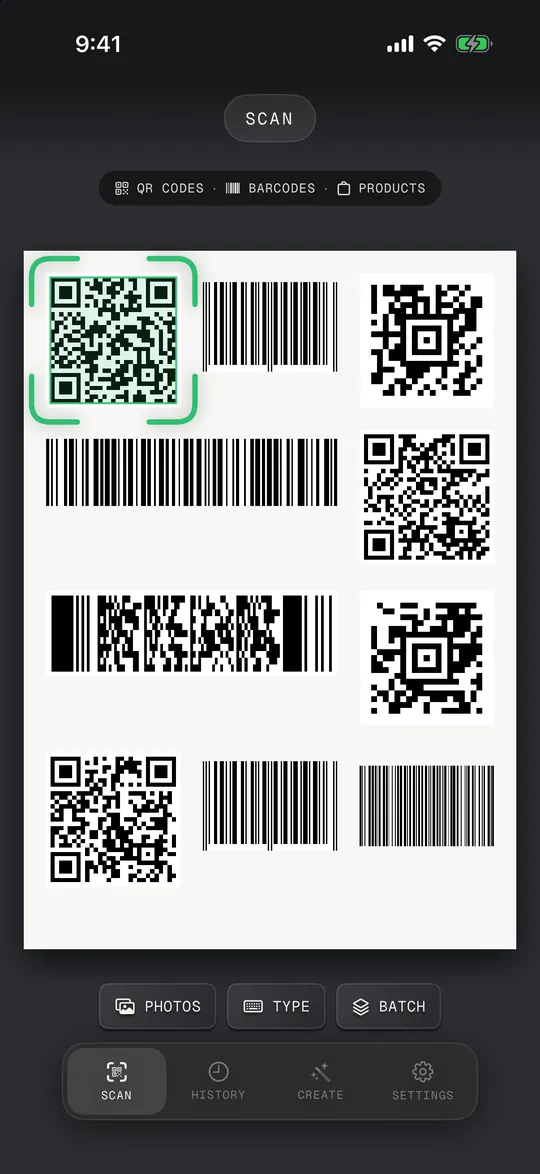
Open QR Code Scan Kit and point the camera at a QR code: it reads it by itself and shows what the code is (a website, Wi-Fi network, contact, event or payment) with one button for the next step. Codes in screenshots and photos work too, and scanning happens on your phone, so it works offline.
 Coming soon
iPhone · iPad · iPhone Duo
- 01
Open the app
It opens straight on the camera. There is no button to press first.
- 02
Point at the code
The corner brackets jump onto the code and turn green when it's read. Pinch to zoom or tap to focus on small codes; the torch helps in dark rooms.
- 03
Read the card
A card shows what the code holds: the full web address, the Wi-Fi network, the contact or the event.
- 04
Tap the next step
Open the link, join the network, add the contact or add the event to your calendar. Nothing opens before you tap.
Photos and screenshots
Tap Photos in the scanner and pick one or more pictures. The app finds every QR code and barcode in them, so codes from a chat, an email or a website work too.
Type it in
If a barcode is torn or won't scan, tap Type and enter the digits printed under it.
Every kind of QR code
Links, text, Wi-Fi, contacts (vCard), email, phone, SMS, events, places, UPI payment codes and parcel tracking numbers each get the right card and the right buttons.
From anywhere on your iPhone
A Scan control for Control Center, the Lock Screen and the Action button opens the scanner in one press.
- It reads codes; it can't fix a code that is damaged beyond its error correction. Our guide on QR codes that won't scan lists what to try.
- Payment codes open your own payment app; QR Code Scan Kit never takes or sends money itself.
How do I scan a QR code with my own phone?
Open QR Code Scan Kit and hold the code inside the frame. If the code is on your own screen (in a screenshot or a chat), tap Photos in the scanner and pick the picture instead.
Can I scan a QR code from a picture?
Yes. Tap Photos and choose the image. The app reads every code in it, on the phone; the picture is not uploaded.
Do I need an app to scan QR codes on iPhone?
No: the iPhone Camera reads QR codes too. A reader app helps when you want the full address before a link opens, codes from photos in one step, barcodes and a history.
Is a QR code reader free?
Free to download. Some extra features are part of Scan Kit Pro — you'll see the options and prices in the app.